


Cricut Machines — Cutting Machines for Every Project
The Cricut Explore 3 is our most popular cutting machine for beginners and everyday crafters. It cuts over 100 materials — including vinyl, iron-on, cardstock, and specialty paper — up to 2x faster than previous Explore models.
With built-in wireless connectivity and compatibility with Cricut Design Space, you can create from any device. The machine cuts and writes in a single step, and features a Smart Set dial that automatically adjusts settings for your chosen material. Perfect for home décor, personalized gifts, party decorations, and DIY apparel projects.
What Makes Cricut Different
Choosing the Right Cricut Machine for Your Projects
We carry the full range of JOANN Cricut machines to match every skill level and project type. The Cricut Joy is our entry point — compact and intuitive for quick cards, labels, and decals. If you’re expanding into apparel, home décor, and party projects, the Cricut Explore 3 gives you speed and versatility across over 100 materials.
For sewists, leather crafters, and makers working with wood or heavy chipboard, the Cricut Maker 3 unlocks 300+ materials with specialized tools like the Rotary Blade and Knife Blade. When your craft business scales to production work, the Cricut Venture delivers 24-inch cutting width and industrial reliability. Our stores stock the complete selection of Cricut accessories and replacement blades to keep your machine running at peak performance.
Materials and Cutting Compatibility
Every Cricut machine at JOANN cuts vinyl, iron-on, and cardstock — the foundation materials for most craft projects. The Explore 3 extends compatibility to felt, faux leather, craft foam, and specialty paper up to medium weight. We recommend it for scrapbookers, card makers, and vinyl crafters who work primarily with flexible materials.
The Maker 3 and Venture add cutting power for rigid and thick materials. Both machines cut genuine leather, 2.4mm basswood, matboard, and corrugated cardboard with the Knife Blade accessory. The Rotary Blade — exclusive to Maker and Venture models — cuts fabric without backing, making them essential for quilters and sewists. Cricut Smart Materials work across all models and eliminate the cutting mat for continuous cuts up to 12 feet on Explore 3 and Maker 3.
Setting Up Your Cricut Machine
Unboxing and First Cut
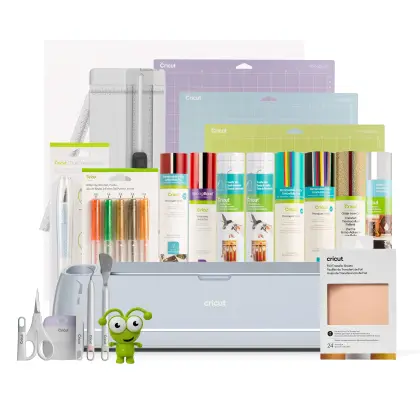
Your JOANN Cricut machine arrives with everything needed for your first project. Open the box and locate the power adapter, USB cable (for wired setup), one cutting blade, and a small sample pack of materials. Plug in the machine, then download the free Cricut Design Space app on your phone, tablet, or computer.
Create a free Cricut account and follow the on-screen setup wizard. The app will prompt you to connect via Bluetooth or USB, register your machine, and calibrate the blade. We recommend completing the included practice project — a simple card or decal — to familiarize yourself with loading materials and adjusting pressure settings.
Complete Your Cricut Setup


Rated 4.8 by verified buyers

Questions About Cricut Cutting Machines?
The Explore 3 cuts over 100 materials with a single Fine-Point Blade and is ideal for vinyl, iron-on, paper, and lightweight crafts. The Maker 3 cuts 300+ materials using 13 different tool types — including the Rotary Blade for fabric and Knife Blade for wood and leather.
Maker 3 has 10x more cutting force and is designed for sewists, leather workers, and makers who need specialized tools. Both machines cut smart materials up to 12 feet and connect wirelessly to Design Space.
No, all Cricut machines work with the free Design Space app on iOS and Android phones and tablets. You can design, edit, and send projects to cut entirely from your mobile device using wireless Bluetooth connectivity.
Design Space also works on Windows and Mac computers if you prefer a larger screen for detailed design work. Your projects sync across all devices through your Cricut account.
Yes, all JOANN Cricut machines work without a subscription. The free Design Space app includes drawing tools, text editing, and the ability to upload your own images and fonts at no cost.
Cricut Access is our optional subscription that unlocks the full image library with over 200,000 graphics and fonts, plus discounts on digital content and materials. Many crafters start with the free version and upgrade later when they want more design options.
Cricut Joy cuts vinyl, iron-on, and cardstock for projects up to 4.5 inches tall and 4 feet long. It’s designed for labels, cards, decals, and small iron-on designs.
Joy works best with Cricut Smart Materials that don’t require a cutting mat. For larger projects or specialty materials like fabric, leather, and wood, we recommend the Explore 3 or Maker 3.
With proper care, a Cricut cutting mat lasts 25-40 projects before needing replacement. Clean your mat after every 3-5 uses by scraping off debris and rinsing under lukewarm water without soap. Air-dry completely before storing.
Heavy materials like glitter cardstock and burlap wear mats faster. We carry replacement mats in StandardGrip, LightGrip, and StrongGrip at all JOANN locations.
Yes, the Cricut Maker 3 and Venture cut fabric using the Rotary Blade accessory without backing or stabilizer for quilting cotton and similar woven fabrics. For stretchy knits and specialty fabrics, we recommend using a FabricGrip mat for stability.
The Explore 3 and Joy require fabric to be backed with iron-on or placed on a mat for cutting. Only Maker and Venture models support the Rotary Blade for true mat-free fabric cutting.
We stock the complete line of Cricut blades, mats, tools, and accessories at every JOANN store and online. Our craft aisles organize products by machine compatibility so you can find exactly what you need.
Bring your machine model name when you visit, and our team can help you select the right blades and materials for your next project. We also carry exclusive JOANN bundles and seasonal material collections.